
If you lead an association, your website is likely overflowing with articles, updates, event recaps, and research—yet most teams still struggle to make that content easy to explore.
That’s because valuable information often lives in too many places at once, scattered across blogs, resource libraries, and microsites. Members can’t find what they need. Search engines can’t connect the dots.
This is exactly why pillar content and topic clusters matter. When your content is organized intentionally, your website shifts from a maze of pages to a strategic, member-friendly knowledge hub.
A pillar-and-cluster approach brings order and clarity to your content architecture. It helps members follow a clear path through your ideas, strengthens your internal linking structure, and gives your high-value pages a real SEO advantage. Instead of competing with yourself, your content starts working together.
In this guide, we’ll break down how pillar content and topic clusters work, why this hub-and-spoke strategy is such a powerful upgrade for associations, and how to implement it step by step. We’ll walk through examples, share practical tips, and answer common questions—so you can take your content from scattered to strategic with confidence.
What Are Pillar Content and Topic Clusters?
A topic cluster (or content cluster) is a group of interlinked pages organized around one broad subject area. At the center is your pillar content—a comprehensive, high-level page that gives members a clear overview of the topic.
Surrounding that pillar are cluster pages, each focused on one specific subtopic. Together, they form a hub-and-spoke model: the pillar is the hub, and each cluster page is a spoke connected through intentional internal links.
Think of it like a well-organized library. The pillar page functions as the section header, while cluster pages act as individual books or chapters.
Example: If your association covers sustainable energy, the pillar might be “Sustainable Energy 101,” supported by cluster pages on:
- Solar innovations
- Wind energy technology
- Energy policy updates
- Renewable energy grants
- Community training programs
Each page goes deep on its subtopic and links back to the central pillar.
This long-form pillar—often called cornerstone content—anchors everything around it. Most associations already have great material spread across blogs, PDFs, or event recaps. The pillar-and-cluster model simply brings that content together so it reinforces your expertise rather than living in isolation.
Key Characteristics of a Pillar–Cluster Model
Pillar Page
A high-level guide covering a broad topic. It targets a wide keyword theme, offers a clear overview, and links out to more detailed content.
Cluster Content
Supporting articles, case studies, videos, or reports that cover narrow subtopics. These pages target more specific, intent-driven keywords.
Internal Linking Structure
Every cluster page links to the pillar content—and often to each other—creating a strong internal linking structure that supports both user navigation and SEO.
Unlike older, rigid SEO siloing methods, pillar content and topic clusters emphasize rich interlinking. This makes it easier for members (and search engines) to move smoothly from big-picture concepts to deeper insights across your content ecosystem.
Why Topic Clusters Matter for Association Content Strategy
A pillar-and-cluster content strategy does far more than clean up your website structure. For associations, it strengthens visibility, improves navigation, and helps members quickly find the information that matters. Here’s why the content cluster model is worth prioritizing.
Boost SEO and Build Topical Authority
One of the biggest advantages of pillar content and topic clusters is how they elevate your topical authority. When your association publishes multiple high-quality, interconnected resources on a subject, search engines see that depth and reward it.
Topic cluster SEO benefits include:
- Broader keyword coverage across your cluster
- Higher authority on complex topics
- Clearer signals to Google that your association is an expert in its field
Google’s E-E-A-T principles (Experience, Expertise, Authoritativeness, Trustworthiness) favor organizations with comprehensive, consistent coverage of a topic. A well-built pillar page supported by multiple subtopic pages demonstrates exactly that. It’s why organizations like HubSpot saw Page 1 keyword growth after re-organizing their content into clusters—topic depth helps you rank across an entire theme, not just individual posts.
Improve Navigation and User Experience
Clusters aren’t just for search engines. They drastically improve how members and visitors move through your site.
A pillar page acts as a central hub, helping readers start broad and click into detailed subtopics. Meanwhile, cluster pages point back to the pillar page for context. The result is a hub-and-spoke content strategy that mirrors how people naturally learn.
Members searching for a topic like Workplace Safety Standards don’t have to rely on your search bar or click through outdated menus. Instead, they get a clear pathway through equipment safety, compliance updates, and training programs—all connected in one place. That leads to stronger engagement and longer time-on-site.
Cover Topics Strategically (and Eliminate Content Gaps)
Using thematic content planning through clusters keeps your content program focused. Instead of producing random one-offs, you’re building resources intentionally around your association’s core themes.
A strong content cluster model helps you:
- Identify missing subtopics
- Avoid redundant articles that compete with each other
- Map content to member needs and strategic priorities
For example, if Telehealth is a priority topic, a cluster makes it obvious if you’re missing subtopics like advocacy updates, case studies, or provider success stories. It’s a clearer, more strategic way to plan your editorial calendar.
Strengthen Internal Linking and Site Architecture
A cluster model naturally creates a healthier internal linking structure. Every subtopic connects to the pillar page, and ideally to related cluster pages. That internal linking:
- Improves indexing
- Helps Google understand relationships between your pages
- Distributes SEO value across the cluster
- Reduces orphaned or hard-to-find pages
This “mini-web” of interconnected content boosts rankings and enhances user flow. It can even contribute to earning sitelinks in Google search results because the structure is logical and intentional.
Demonstrate Leadership and Deliver More Member Value
Associations thrive when members see them as trusted sources. A well-organized cluster around your key themes—financial planning, telehealth, sustainability, advocacy, workforce development, anything—underscores your expertise.
It also enhances the member experience. When content is easy to find, comprehensive, and logically connected, members rely on your site as their go-to resource. Strong clusters can even attract non-members who discover your content via search and recognize your authority immediately.
The Real Win: A Smarter, More Connected Content Experience
Pillar content and topic clusters solve some of the most common challenges associations face—scattered resources, inconsistent navigation, underperforming SEO, and unclear content priorities. By organizing information intentionally, you transform your website into a strategic, member-first knowledge hub. It’s the difference between a content archive and a content engine.
The Hub-and-Spoke Content Cluster Model in Action
A hub-and-spoke content cluster model is the simplest way to understand how pillar content and topic clusters work together. Think of it as a structured map of your knowledge: one central pillar page surrounded by several subtopic pages, all connected through intentional internal links.
How the Structure Works
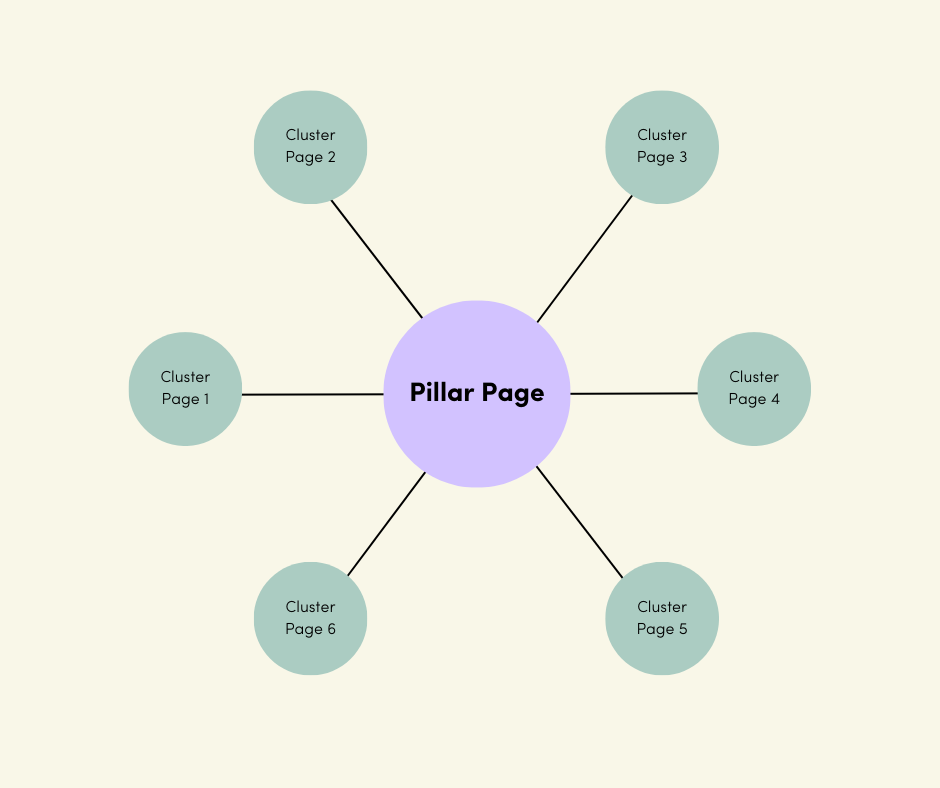
In this model, the lavender center represents your pillar page—the high-level, authoritative resource on a broad topic. The surrounding green nodes are your cluster pages, each covering one focused subtopic.
The lines between them illustrate the internal linking structure. Cluster pages link back to the pillar, the pillar links out to each cluster, and—when it makes sense—cluster pages may link to each other as well.
The size of your cluster varies. Some topics might need five subtopics; others might require fifteen. What matters is that every page connects intentionally, creating a cohesive content architecture for SEO rather than a loose set of articles.
A Realistic Association Example
Imagine an association for small business owners. Digital marketing is a core knowledge area for your members, so you build a pillar page titled:
“The Small Business Guide to Digital Marketing”
This page covers the essentials—SEO, social media, email, analytics—at a high level. From there, you build your cluster content:
- In-depth guide to SEO for Small Businesses
- Social Media Marketing for Small Business
- Email Marketing Best Practices
- Case Study: Content Marketing Wins
- Paid Advertising 101 for Small Budgets
- Measuring Marketing ROI Checklist
And using this example, your hub and spoke would look like this:
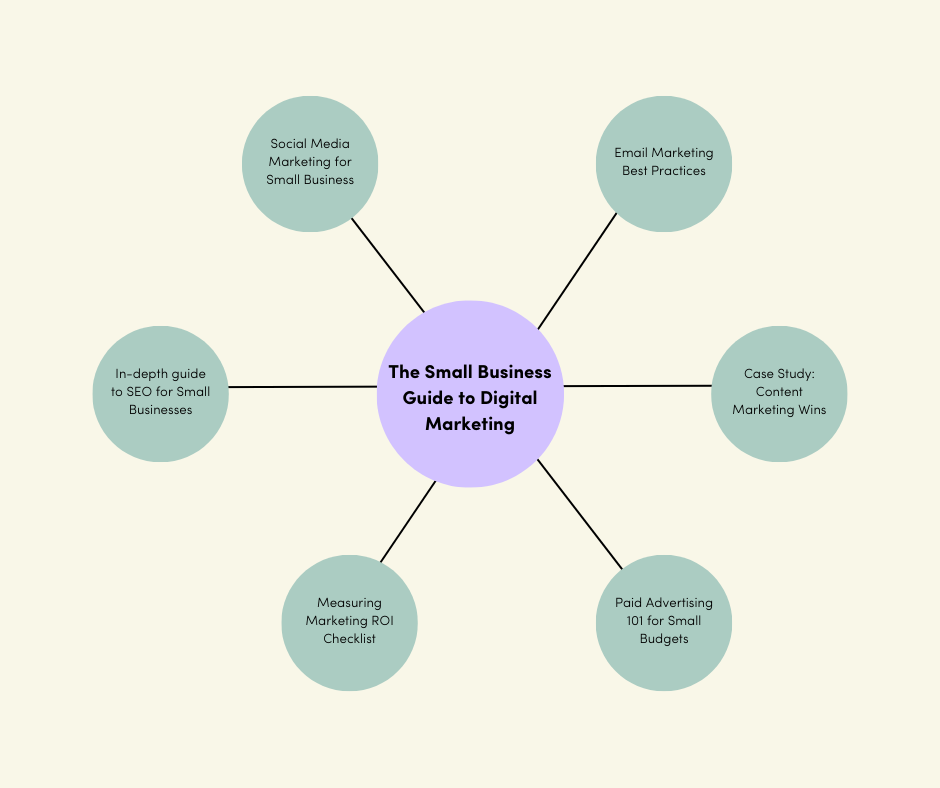
Each of these cluster pages links back to the main digital marketing pillar. The pillar page, in turn, introduces each subtopic and links out to every cluster page—like a mini table of contents.
This setup ensures that a visitor arriving through Google on a niche article (say, “SEO Tips for Local Businesses”) can easily jump to the broader hub or explore related topics without leaving your site.
Why This Model Works for Associations
The hub-and-spoke approach is endlessly adaptable. A medical association might build pillar pages around Patient Safety, Public Health Policy, or Clinical Innovation. A trade association might cluster learning around Workforce Development, Regulatory Changes, or Industry Standards.
Over time, your site becomes a network of structured hubs instead of a long, chronological blog roll. Members gain clarity. Search engines understand your authority. And your staff has an easier time maintaining content as topics evolve.
When a major update happens in a topic area, the pillar page becomes your single source of truth. Update the hub, add or expand subtopics as needed, and the entire cluster stays relevant and aligned.
The Real Win: A Smarter, More Connected Content Experience
Many organizations have seen measurable gains using this model, and associations can achieve the same outcome in their domains—owning strategic topic areas because their content isn’t scattered, it’s structured.
Implementing a Pillar-and-Cluster Content Strategy in Your Association
So how do you go from theory to practice? Implementing pillar content and topic clusters in your association’s content strategy is part content audit, part SEO planning, part content creation, and part ongoing governance. Here’s how to put a pillar page strategy to work step by step.
1. Audit Your Existing Content and Identify Themes
Start by taking stock of what you already have. Most associations are sitting on years of publications, blog posts, event materials, toolkits, and reports that were never organized with a content cluster model in mind.
Group content by topic
Look for repeating themes and natural buckets. For example, an education association might quickly see topics like:
- Student achievement
- Teacher training
- Education policy
- Classroom technology
Capture these as draft themes.
Identify your core topics
From those themes, decide which are most important to your mission and to member needs. These are your likely pillar topics. Strong pillar candidates:
- Are broad enough to support multiple subtopics
- Are specific enough that they feel focused (e.g., “Digital Learning in K–12 Education,” not just “Education”)
- Already have (or will soon have) several related assets
If you only have one piece of content on a theme and no plans to expand it, it likely isn’t a pillar.
Spot gaps and overlaps
Your audit will also expose:
- Duplicate articles competing for the same subtopic or keyword
- Important subtopics with little or no coverage
Many organizations discover older posts are unintentionally “competing with each other in search engine results” due to overlapping topics. An audit helps you see where to consolidate, refresh, or expand so each future cluster has a clear purpose.
By the end of this step, you should have:
- A shortlist of potential pillar topics
- A sense of existing subtopics (cluster content) under each
- A clear view of content gaps and redundancies
2. Use Keyword Research to Shape Your Clusters
Once you have candidate pillar topics, validate them with data. This is where keyword grouping for content planning comes in.
Do targeted keyword research
For each potential pillar topic:
- Identify a primary keyword (e.g., “digital marketing for small business”)
- Look at related searches and questions (e.g., “small business SEO tips,” “social media ideas for small businesses”)
This confirms what people actually search for and which subtopics matter most.
Group related keywords under each pillar
Cluster related queries together. For a pillar on “Workplace Safety,” you might see natural groups such as:
- Workplace safety training
- OSHA compliance tips
- Safety equipment guidelines
- Incident reporting procedures
Each group can become a cluster, with its own set of specific questions and phrases to target.
Assess difficulty and opportunity
Tools that show keyword difficulty help you:
- See where search results are crowded by government sites or large publishers
- Spot under-served topics where your association can stand out
You’re not chasing only “easy” keywords, but you are choosing smart angles where your pillar page strategy and clusters have a real shot at visibility.
Translate insights into a content plan
Use what you’ve learned to:
- Map existing content to clusters
- Flag subtopics where content is thin or missing
- Prioritize new content creation based on member relevance and search demand
Now your clusters are driven by both your strategic priorities and real audience behavior—not guesswork.
3. Create (or Identify) Your Pillar Pages—Your Cornerstone Content
With pillar topics and subtopics defined, decide whether you’ll:
- Elevate an existing “definitive” piece into a pillar page, or
- Create a new pillar page from scratch
Make the pillar comprehensive and high-level
A pillar page:
- Covers the topic in depth at a high level
- Stands on its own as a valuable resource
- Points to cluster pages for deeper dives
For associations, this might look like a long-form guide, a resource hub, or an “everything you need to know” article on a major issue.
Structure it around your clusters
Give each subtopic a section that:
- Offers a concise overview
- Links to the full cluster page (“Learn more in our full guide to workplace safety training”)
This mirrors your cluster architecture on the page and makes exploration easy.
Optimize on-page SEO
- Use the pillar keyword in the title tag, H1, URL, and meta description
- Keep the URL clean and descriptive (e.g., /resources/digital-marketing-guide)
- Make headings scannable for both readers and search engines
Keep it engaging and evergreen
- Break up text with visuals, diagrams, or data points
- Use association-specific examples and member stories
- Plan to review and update regularly so it stays current and authoritative
This is your cornerstone content. It carries weight for SEO and for your reputation as a trusted source.
4. Develop Cluster Content for Each Subtopic
Next, build or refine the cluster content around each pillar.
Focus each piece on one clear subtopic
Where the pillar is broad, each cluster page should answer one specific question or need, such as:
- “Preventing Phishing Attacks for Nonprofits”
- “Grant Writing Tips for First-Time Applicants”
Provide real depth: step-by-step how-tos, examples, checklists, or case studies.
Maintain quality and depth
Cluster pages:
- Should be the best answer on that subtopic
- Can absolutely be long if the topic demands it
- Build the overall expertise and authority of your cluster
Link back to the pillar (and across clusters when helpful)
- Include a clear, contextual link back to the pillar page—ideally early in the content
- Use anchor text that includes the pillar topic where it feels natural
- Cross-link between cluster pages when it genuinely helps the reader follow related ideas
Optimize for on-page SEO and member action
- Include the subtopic keyword in title, headings, and meta description
- Tag or categorize cluster pages under the correct topic hub
- Add CTAs tied to the topic (e.g., register for a related webinar, download a resource, or join a committee)
Clusters aren’t just about visibility—they’re also strong entry points into deeper engagement.
5. Lock In a Strong Internal Linking Structure
This step turns your content into a real hub-and-spoke content strategy instead of just a list of pages.
From pillar to cluster
- Ensure the pillar page links to every cluster page
- Use a clear index-style section or table of contents, plus contextual links where relevant
- If content isn’t live yet, you can note “coming soon,” then update with links once published
From cluster back to pillar
- Each cluster page should link to the pillar at least once
- Use consistent, descriptive anchor text so readers recognize the hub
Smart interlinking among clusters
- Add links between related cluster pages where context calls for it
- Keep it intentional—pillar ↔ cluster is the backbone; cluster ↔ cluster is a bonus
Reflect clusters in your navigation where possible
- If your IA allows, highlight pillar topics in your Resources or Knowledge Center menu
- This reinforces your content architecture for SEO and makes hubs easy to discover
Once links are in place, click through as if you’re a member:
- Can you move easily from broad to specific and back again?
- Is anything orphaned or hard to reach?
Fix those issues now while the structure is fresh.
6. Promote, Monitor, and Maintain Your Content Clusters
Once your pillar content and topic clusters are live and linked, they become powerful long-term assets—but they still need attention.
Promote your pillar hubs
- Feature them in newsletters as “Resource Hubs” or “Guides”
- Share them on social, highlighting subtopics and member takeaways
- Pin them in your online community or resource library
- Consider using them as destination pages for campaigns or search ads
Monitor performance
Track both SEO and engagement:
- Organic traffic and rankings for pillar and cluster keywords
- Time on page, pages per visit, and click-through from pillar to clusters
- Which clusters are getting traction, and which might need refinement
If a cluster underperforms, review its angle, depth, and optimization.
Keep clusters fresh and evolving
- Update pillar pages regularly with new data, examples, and links to new subtopics
- Refresh clusters when regulations change, best practices shift, or member questions evolve
- Add new cluster pages as your association’s strategic priorities grow
Bake the model into your content governance
- Train staff and contributors to map every new piece to an existing pillar or clearly define when a new pillar is needed
- Use your editorial planning process to extend clusters rather than create random one-offs
- Assign someone to keep an eye on the overall cluster map so it stays coherent over time
Done well, this becomes your default way of doing content—not a one-off project.
From Content Chaos to a Connected Strategy
When you fully commit to pillar content and topic clusters, your association’s website stops being an archive of isolated posts and starts functioning as a strategic knowledge hub.
You’re not just publishing more content—you’re building a connected system:
- Pillar pages show your depth and authority.
- Cluster content answers specific member questions.
- A strong internal linking structure ties everything together for both users and search engines.
Over time, this structure compounds. Your content becomes easier to find, easier to use, and more clearly aligned with the topics your association wants to lead on.
FAQs: Implementing Topic Cluster Strategy in Associations
Do we need to create new content for pillar pages and clusters, or can we reorganize what we have?
You can almost always start with what you already have. Many associations can turn existing materials—blog posts, whitepapers, toolkits, and session recaps—into strong pillar content and cluster pages.
A practical starting point:
- Run a content audit on one strong topic where you already have multiple pieces.
- Create a pillar page that ties those assets together.
- Update and optimize existing pieces as cluster pages, then fill any obvious gaps with new content.
You don’t have to rebuild your library from scratch. Treat topic clusters as an evolutionary process that organizes and strengthens what you already do well.
How long should a pillar page be? Is there a recommended word count?
There’s no strict rule, but pillar pages are usually much longer than a standard blog post because they function as comprehensive guides.
As a general range:
- Many pillar pages land between 2,000–4,000 words.
- Some go longer if the topic truly warrants it.
The goal is depth and clarity, not padding. It’s better to offer a sharp, useful 2,500-word guide than a 5,000-word piece that feels repetitive. Use headings, bullets, and visuals to keep the page readable, and plan to update and expand it over time as your content cluster grows.
What if some of our content is members-only or behind a login—can it still be part of a cluster?
Yes, but its role is different.
- Members-only pages won’t be crawled by search engines, so they won’t directly support your SEO topical authority.
- They can still be valuable inside your topic cluster for logged-in users.
A common approach:
- Create a public-facing pillar page and several public cluster pieces for SEO visibility.
- Within that structure, link to “members-only” resources clearly labeled as such.
You may also choose to publish high-level public summaries that point to deeper, gated content. That way you support both search visibility and member value within the same content cluster model.
How many cluster pages should each pillar have?
It depends on the topic, but a pillar usually needs more than a couple of supporting pages to justify its existence.
Guidelines:
- Many strong clusters start with 6–8 cluster pages.
- Mature clusters often grow to 10–20 pieces over time.
Quality matters more than volume. Each cluster page should have a clear, distinct purpose. If subtopics begin to overlap heavily, you may be slicing the topic too thin and confusing both readers and search engines.
How long does it take to see SEO results from a pillar-and-cluster strategy?
Topic cluster SEO is a long-term play, not a quick fix.
Typical patterns:
- Early movement on some keywords in 2–3 months.
- More meaningful gains in 6–12 months as search engines fully crawl and evaluate your updated structure.
You’ll often see:
- Growth in the number of keywords you rank for.
- Gradual improvements in rankings and organic traffic.
- More visibility across long-tail queries related to your pillar topic.
The compounding effect is the real win—once your pillar content and topic clusters are established and maintained, they tend to hold their value and keep working for you.
Is the topic cluster model only for SEO, or does it help with other goals?
SEO is a major benefit, but it’s far from the only one. A well-designed content cluster model also:
- Makes content easier to find for members and staff.
- Increases internal pageviews and time-on-site.
- Gives your content team a clear framework for what to create next.
- Reinforces your association’s thought leadership on key issues.
Pillar content and topic clusters can also support onboarding and education. Pointing a new member to a pillar page on a high-priority topic gives them an instant primer and a clear path into your best resources, which supports engagement and retention.
How is this different from just having good site navigation or a blog category?
Navigation and categories help people browse. A topic cluster strategy organizes the content itself.
Key differences:
- A blog category often just lists posts in reverse chronological order.
- A pillar page actively summarizes the topic and intentionally links to curated subtopic pages.
- Cluster pages link back to the pillar and often to each other, creating a true internal linking structure.
In other words, category pages are usually structural. Pillar pages are content-rich, optimized to rank, and designed to guide readers through your knowledge. Many associations use both: navigation drives visitors to the pillar, and the pillar unlocks the full cluster.
Our association covers a lot of disparate topics. Should we create clusters for everything at once?
No—you’ll get better results by prioritizing.
Start with:
- 2–3 core topics where you already have meaningful content or urgent strategic focus.
- Areas where increased visibility and authority would make a real difference this year.
Build those clusters first, learn what works, then expand. The content cluster model is highly scalable, but trying to launch a dozen clusters at once usually dilutes effort and delays impact.